CRM + field service management for home services

The AI-native CRM and FSM built for home service businesses

HomerAI is one system for running a home service company. The CRM that holds your customers, pipeline, and follow-ups. The field service tools your crews work from, job to payment. And AI agents that answer your phone and your website — all working from the same customer record.

See it in action

The whole platform in under two minutes

From a 2am call the AI receptionist books, to the dialer, routes, photo proof, marketing, the website builder and the AI analytics that tie it together.

What's inside

A CRM, a field service platform, and AI agents — in one

Most HVAC, plumbing, electrical, and roofing companies run a CRM in one tab, scheduling in another, and an answering service on the side. HomerAI replaces that stack with one system, so nothing has to be copied between them.

CRM

Every customer, lead, and company in one place, with the history of every conversation attached.

  • Contacts, companies & contact lists
  • Lead, lifecycle & deal pipeline
  • Tasks, owners & activity timeline
  • Automated sales sequences
  • Outbound calling from the record
  • Email, SMS & social media marketing
Setup

Set up from your own website, in minutes

New software usually means weeks of typing your business into empty screens. Point Homer at your website instead, and it drafts the setup from the services you actually offer — for you to review and adjust, not start from scratch.

Job checklists, per service

A field checklist for each distinct service on your site — up to twelve, across every trade you run.

Follow-up sequences

Ready-to-edit sales sequences for the situations every home service business has, like new leads and unsold quotes.

Your AI agents' instructions

The receptionist and chatbot prompts, written from every page of your site — plus any price sheets or service documents you upload.

Company details, filled in

Add a company by its website and Homer fills in its description, industry, phone, email, and location.

On-brand email templates

Marketing templates pre-filled with your brand colour, tagline, and services.

Your service area, respected

Tell Homer which cities you cover, and the AI won't book jobs outside them.

AI in the CRM

An assistant that works inside your customer records

Homer's AI isn't only on the phone. The CRM reads your calls, writes the overview on every screen you open, and tells you where to spend the day — and nothing is saved until you confirm it.

  • Just ask. Add a contact or company, book an appointment, or build a sales sequence by describing it. Homer drafts it; you confirm.
  • Who to call today. Homer ranks your real contacts by what's happening with them, and tells you why each one made the list and what to do next.
  • Calls recorded and transcribed. Every sales call is captured and written up automatically, so nothing depends on someone remembering to take notes.
  • Coaching for the team. A rep-by-rep read on call activity: what's working and where there's room to improve.
  • AI overviews, everywhere you look. Your dashboards, sales calls, task list, schedule, and social media each open with a written summary, the wins, and what needs attention — regenerated on demand, never a stale report.
  • Summaries on the customer's record. Every call and chat is summarised in a few lines and filed against the contact, so whoever picks it up next reads the gist instead of the transcript.
  • Social posts, drafted. Write Facebook posts with AI and publish or schedule them from the CRM — with suggestions drawn from your real job photos.
  • Your marketing, read back to you. Homer reviews how your Facebook posts and ads actually performed alongside your email and SMS campaigns, quotes and new leads, and writes up what's working and what to change — down to which ad is earning its budget. See Facebook analytics LinkedIn and Google Ads analysis are on the way.
AI voice agent

It answers before the second ring. Every time.

Most home service calls that go to voicemail never call back — they call the next company on the list. Homer picks up on nights, weekends, holidays, and during the eleven minutes your CSR is on another line.

  • Qualifies properly. Trade, symptom, urgency, address, equipment age, whether they're a member, and how they heard about you.
  • Books real slots. It reads the live board — capacity, skills, drive time — so it never promises a window you can't hit.
  • Knows an emergency. Gas smell, no heat in a freeze, active water. It escalates to your on-call human immediately.
  • Hands off gracefully. Any caller who asks for a person gets one, with the context already gathered.
  • Speaks Spanish and English, and switches mid-call when the caller does.

The same agent also runs a chatbot and a voicebot on your website, booking into the same schedule.

Autonomous dispatch

The board builds itself, then keeps rebuilding

A dispatcher optimises once, at 7am, with the information they had at 7am. Homer re-optimises every time something changes — a job runs long, a truck breaks down, a customer cancels, a same-day emergency lands.

  • Considers what dispatchers can't hold in their head: certifications, live traffic, overtime cost, and who closes best on that job type.
  • Fills the gaps. Cancellations get backfilled from deferred work automatically.
  • Tells the customer first. When a window slips, the affected customers get a new ETA before they think to call you.
  • Explains itself. Every assignment comes with the reasoning, and your dispatcher can override any of it.
Show your work

Prove Every Job — Before & After, With Annotations

Snap a photo before you start and after you finish, and HomerAI turns them into a drag-to-reveal before/after right inside the job. Circle the problem, drop an arrow, add a note — then send it to the customer to win the review, justify the price, and close the next job. Included on every plan.

How before & after photos work

Before / after slider

The full transformation, side by side

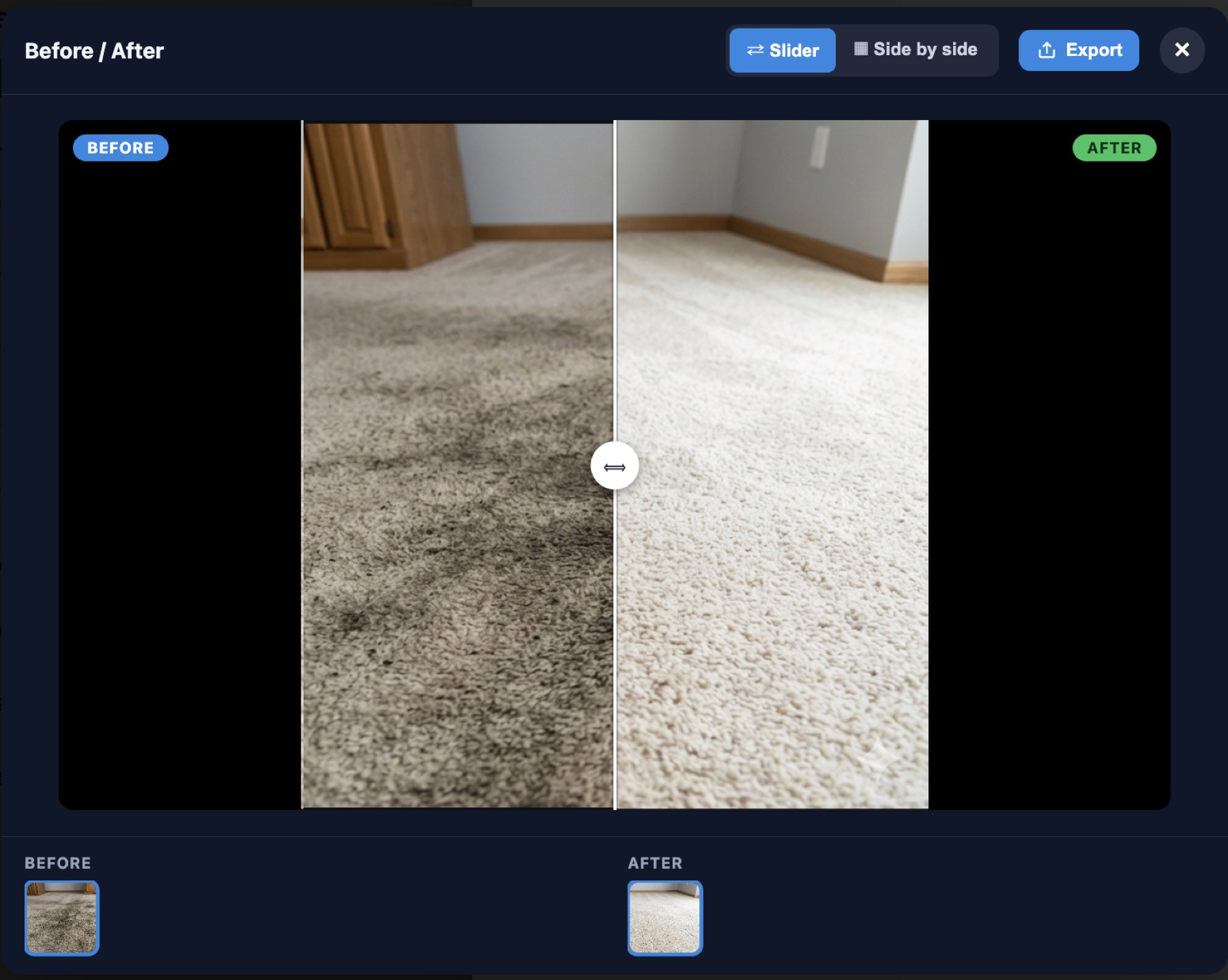
Snap a before and after, and HomerAI pairs them into one shareable comparison — slider or side-by-side, then export it to send.

HomerAI before and after viewer showing a dirty carpet on the left and the same carpet cleaned on the right, with a drag handle between them and Slider, Side by side and Export controls.
Photo annotations

Mark up any photo in seconds

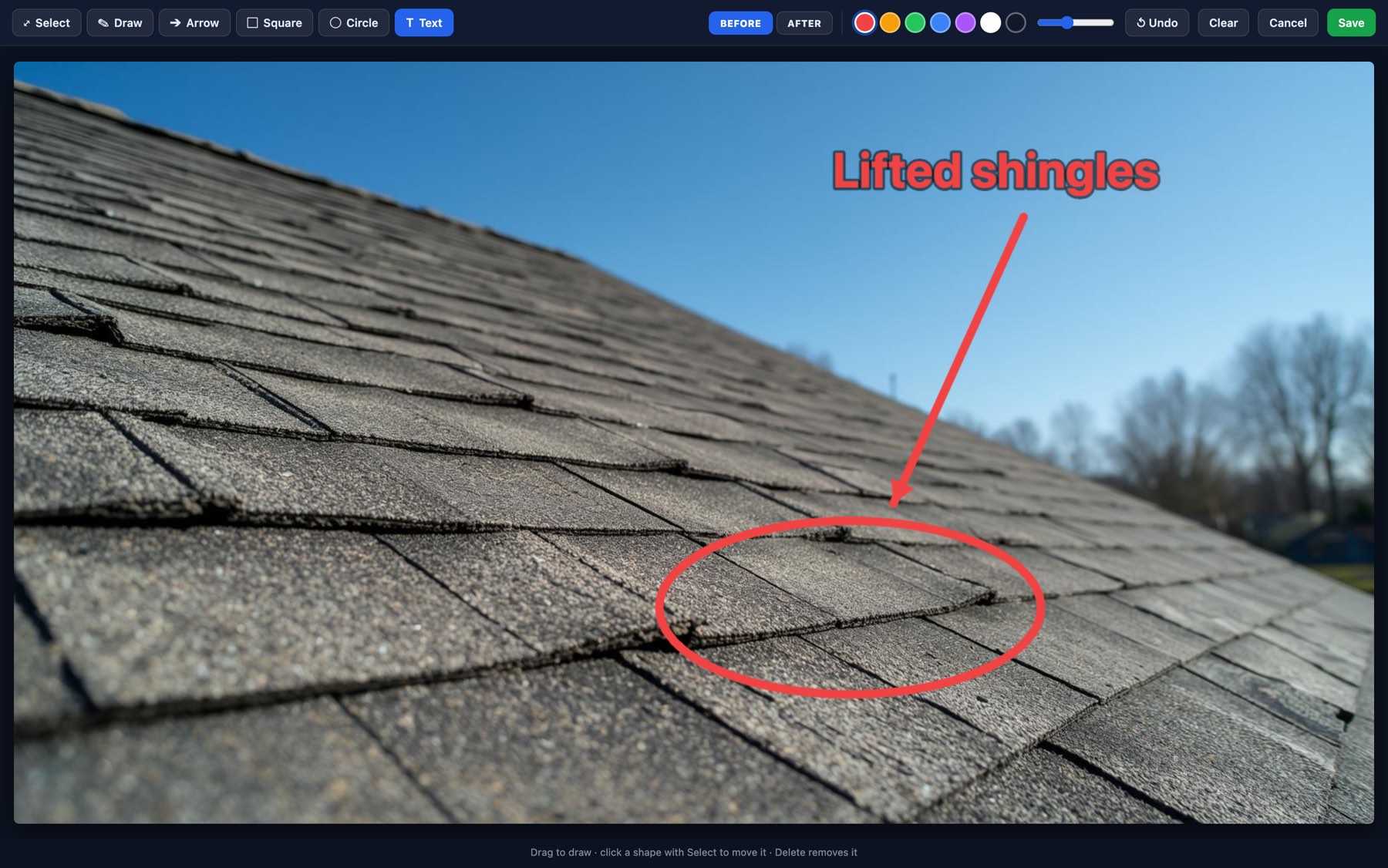
Draw, add arrows and text, and highlight exactly what matters — right on the photo, then tag it before or after.

HomerAI photo annotation editor with Select, Draw, Arrow, Square, Circle and Text tools and Before / After tags, showing a roof photo with lifted shingles circled in red, an arrow, and the label 'Lifted shingles'.

Justify the price

A homeowner who sees what was behind the panel stops asking why the quote looks like that. The photo does the explaining.

Win the review

A dramatic before/after is the thing customers actually share — and the proof that turns a happy customer into a five-star review.

Settle the dispute

Timestamped photos of the condition you arrived to, attached to the job record, end the "it wasn't like that before" conversation.

Checklists

Know Exactly What Was Done — And When

Build inspection and sign-off checklists for any job, then let your crew work the list in the field. The moment a task is marked complete, HomerAI stamps it with the tech's name and the exact date and time — so you get a verifiable record of the work, and your customers get proof it was done right.

  • Timestamped completion. Every item logs who checked it off and the exact date and time — down to the minute.
  • Pass, Flag, or Fail. Turn any inspection point into a clear sign-off with a single tap.
  • More than tick boxes. Capture readings, tick off individual components, and require the items that matter.
  • Proof for customers & insurance. A clean, timestamped record of exactly what was completed on every job.
Equipment & warranty tracking

Every unit you've touched, and every warranty, on file

Each customer carries a record of the equipment at their property. Homer watches the warranty dates for you, so “is this still covered?” is answered before the truck rolls — and an expiring warranty becomes a phone call instead of a missed replacement.

  • The full record. Equipment type, make and model, serial number, install date and warranty expiry, kept on the customer — not buried in a job note.
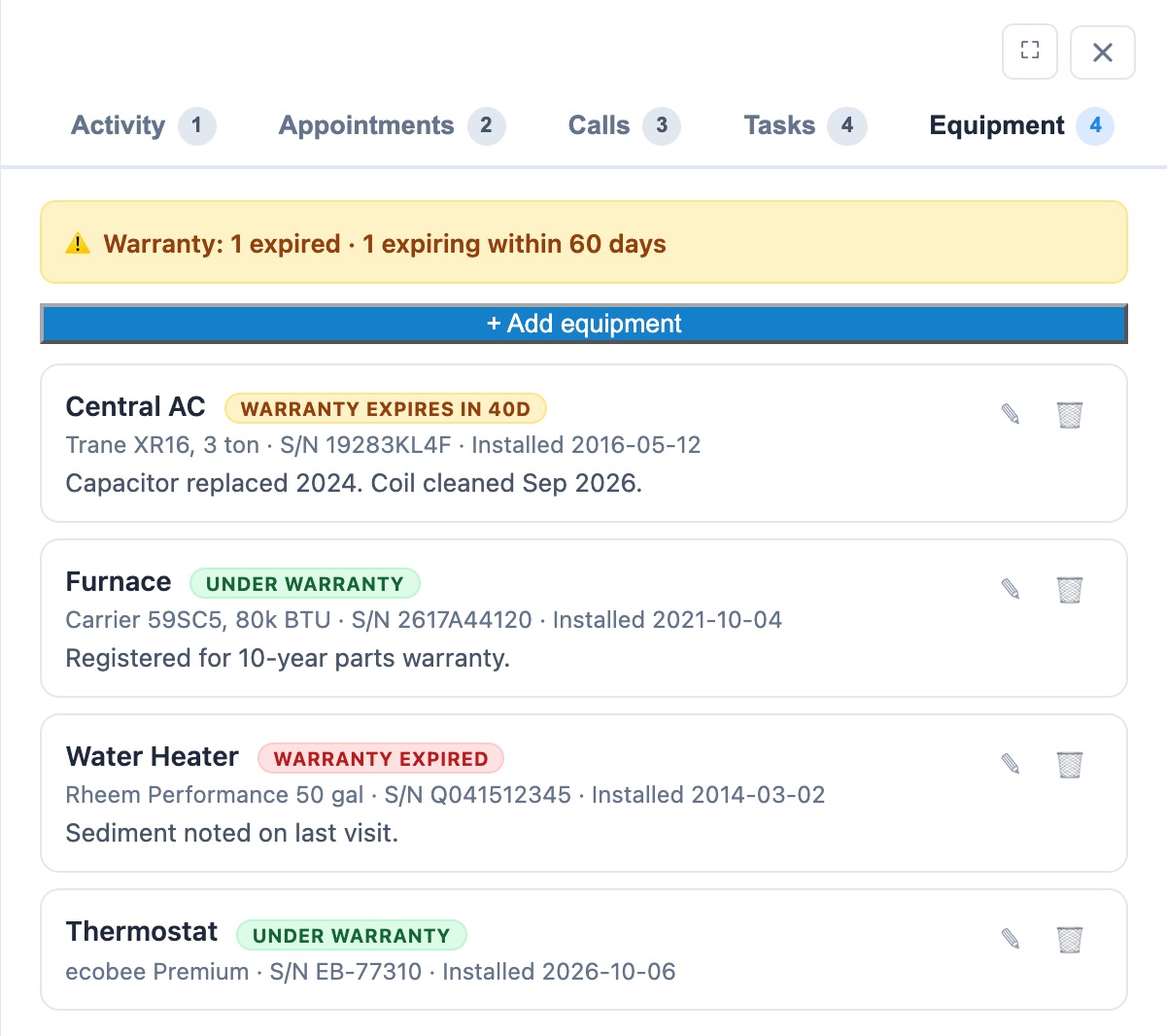
  • Warranty status at a glance. Every unit is badged under warranty, expiring soon or expired, and a banner on the customer flags anything lapsing within 60 days.
  • Turned into sales. Customers whose warranty runs out within 90 days move up Homer’s “who to call today” list, with the reason why — the window where a replacement is a service call, not a complaint.
  • Just tell Homer. “Add a Trane XR16 installed May 2016 to Carlos Ramirez.” The AI assistant fills in the equipment record or updates a warranty date; you confirm before it saves.
  • Ask across every customer. “Which customers have warranties expiring in the next 60 days?” gets you the list in plain English.
The Equipment tab on a customer in HomerAI: a banner reading 'Warranty: 1 expired, 1 expiring within 60 days', and four units — a Trane central AC whose warranty expires in 40 days, a Carrier furnace and an ecobee thermostat under warranty, and a Rheem water heater whose warranty has expired — each with serial number, install date and service notes.
Property records

Know the house before you knock

Look up any customer's home from their record. One click pulls in the facts about the house at the service address, so whoever quotes, dispatches or answers the phone knows what they're walking into.

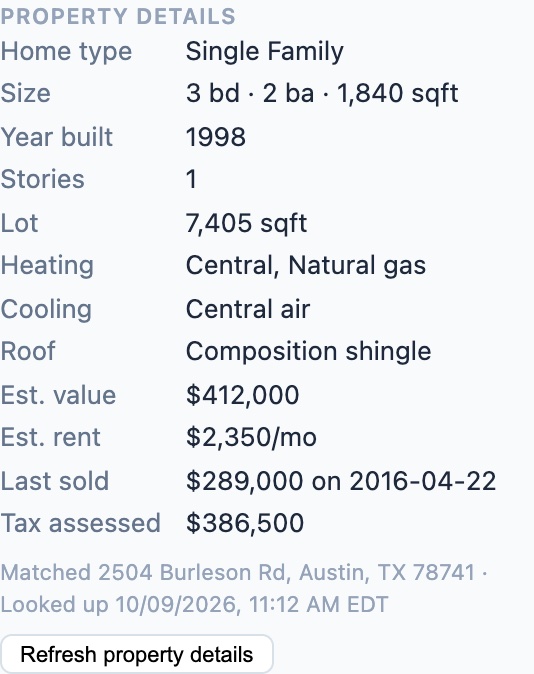
  • The house, before the visit. Beds, baths, square footage, lot size, stories and year built — size the system or the job before the truck rolls.
  • What’s already there. Heating, cooling and roof type, when the listing records them.
  • Value and history. Estimated value and rent, last sale price and date, and tax-assessed value — context for financing and replacement conversations.
  • One customer or a whole list. Look up a home from the customer’s record, or select contacts and look them all up at once. Refresh whenever you need to.
  • A monthly allowance by plan. Only lookups that find a property count toward it, and you can see how many you have left before you run a batch.
A Property details panel on a HomerAI customer record: single family, 3 bedrooms, 2 baths, 1,840 square feet, built 1998, one story, central natural-gas heating, central air, composition shingle roof, estimated value $412,000, last sold for $289,000 in 2016, and tax-assessed value $386,500.

Details vary by home and by what's on public record.

Quoting & sales

Get the quote out while the customer still cares

The gap between the conversation and the price is where jobs go cold. Build quotes from your own templates and product catalogue, or let Homer draft one from the conversation you just had.

Templates & line items

Save the quotes you send every week as templates, and build them from a product catalogue of your own services and prices.

Drafted from the conversation

Homer turns a customer conversation into a draft quote for you to review, so nobody retypes what the customer already said.

Followed up automatically

Unsold quotes go into a sales sequence of emails, texts, and call tasks that stops the moment they reply.

Sales sequences

Follow Up on Every Quote — Automatically, Until They Say Yes

Most jobs are lost to silence, not to "no." Build a multi-step follow-up sequence once, and HomerAI works every lead for you — sending emails and texts on their own and dropping call tasks onto your team's list, all spaced out on business-day timing so nothing slips through the cracks.

  • Multi-channel by design. Automated emails, text messages, and call tasks in one coordinated sequence.
  • Business-day timing. Waits skip weekends, so every touch lands when customers are actually working.
  • Set it and forget it. Enroll a contact or company in one click, and reuse your best sequences as templates.
  • Stops when they reply. A booked job or an answered call ends the sequence — nobody gets chased after they've said yes.
  • Included, not an add-on. Sales sequences come standard on the Growth and Custom plans.
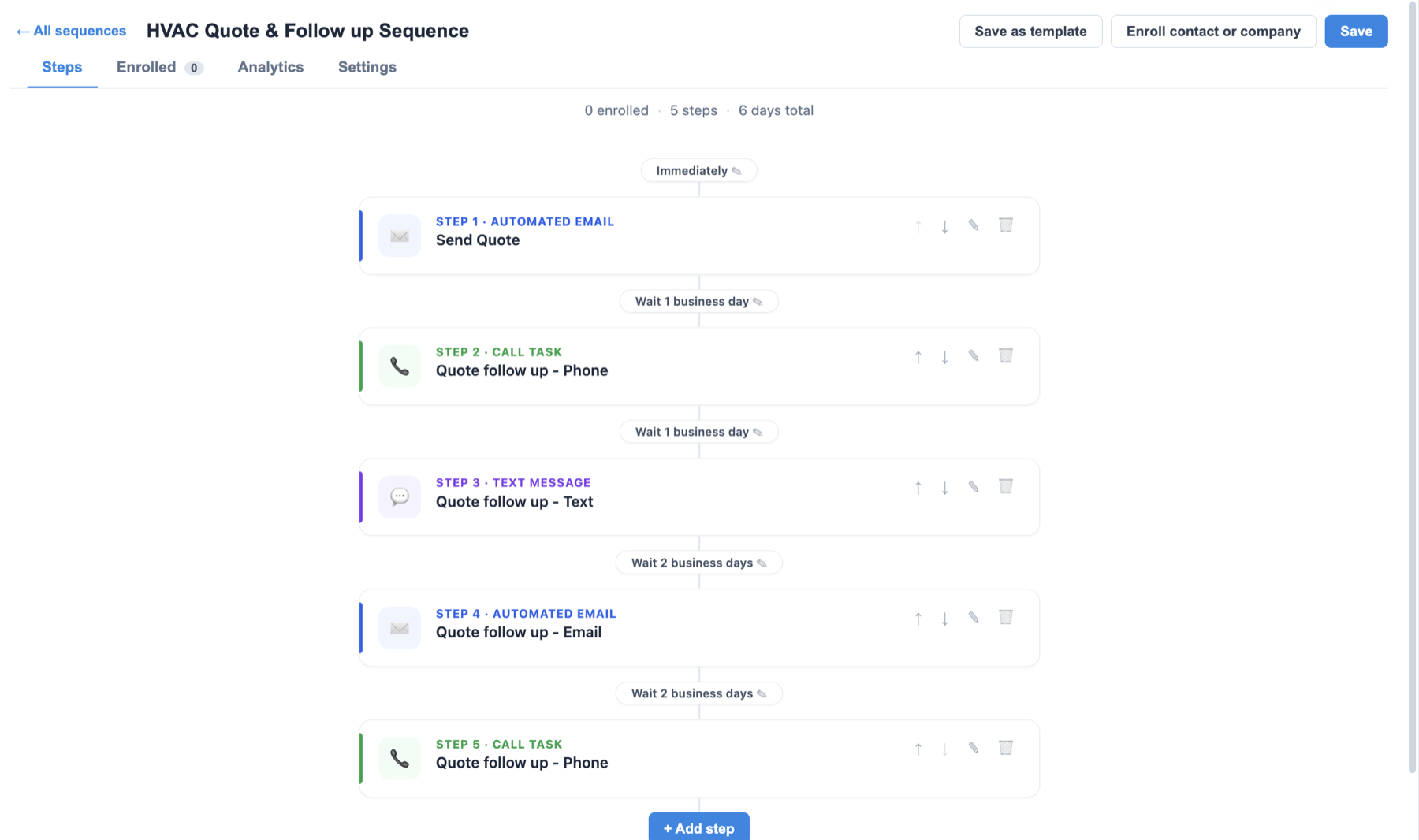
HomerAI sequence builder showing a five-step HVAC quote follow-up: send quote, wait one business day, phone call task, text message, email, and a final call task over six days.

Five steps, six days, zero reminders on your calendar.

AI parallel dialer

More conversations per hour, with a coach on every call

Your rep starts a dial block and HomerAI calls up to four leads at once. The first person to answer is connected straight away, voicemails are screened out, and an AI coach puts your own pitch in front of the rep for that exact lead.

  • Up to four lines at once. The rep stays on one line for the whole session and is connected the moment someone picks up. No redialing between leads.
  • Voicemails screened out. Answering-machine detection hangs up on voicemail, so reps spend their time talking to people.
  • Compliance built in. Every list is checked before a number is dialed, calls only go out between 8am and 9pm where the lead is, and the dialer slows down automatically to stay under the FTC's 3% abandoned-call limit.
  • Your pitch, in sections. Greeting, what you sell, who it's for, pain points, proof, objections and the ask. An AI assistant helps you write and tighten each one.
  • A talk track for every lead. While the phones ring, Homer reads that lead's CRM notes and builds an opener, questions and objection answers in the sales method you pick: SPIN, Challenger, Sandler, Gap Selling, NEPQ or consultative.
  • Live coaching. With call recording on, the call is transcribed as it happens and Homer suggests what to say next each time the prospect finishes speaking.

Included on Growth plans and above.

Payments

Card payments on quotes

A quote the customer can pay the moment they say yes is a quote that doesn't sit in an inbox. Send it with a secure checkout link, and the money lands in your own account.

  • Pay by card online. Every quote can carry a secure Stripe checkout, so a yes and a payment are the same click.
  • Paid into your account. Payments settle to your own connected Stripe account, set up from inside HomerAI.
  • No card details in your hands. Stripe handles the card, so card numbers never touch your office or your CRM.
Reporting

Ask the question. Get the number.

No report builder, no BI consultant, no exporting to a spreadsheet at 10pm. Ask in plain English and Homer answers from live data — and shows the query it ran so you can trust it.

"Which marketing source produced the highest average ticket last quarter?"

"Show me techs whose callback rate is above 8% this month."

"Which customers have equipment warranties expiring in the next 60 days?"

"What did we lose to unbooked after-hours calls before we switched?"

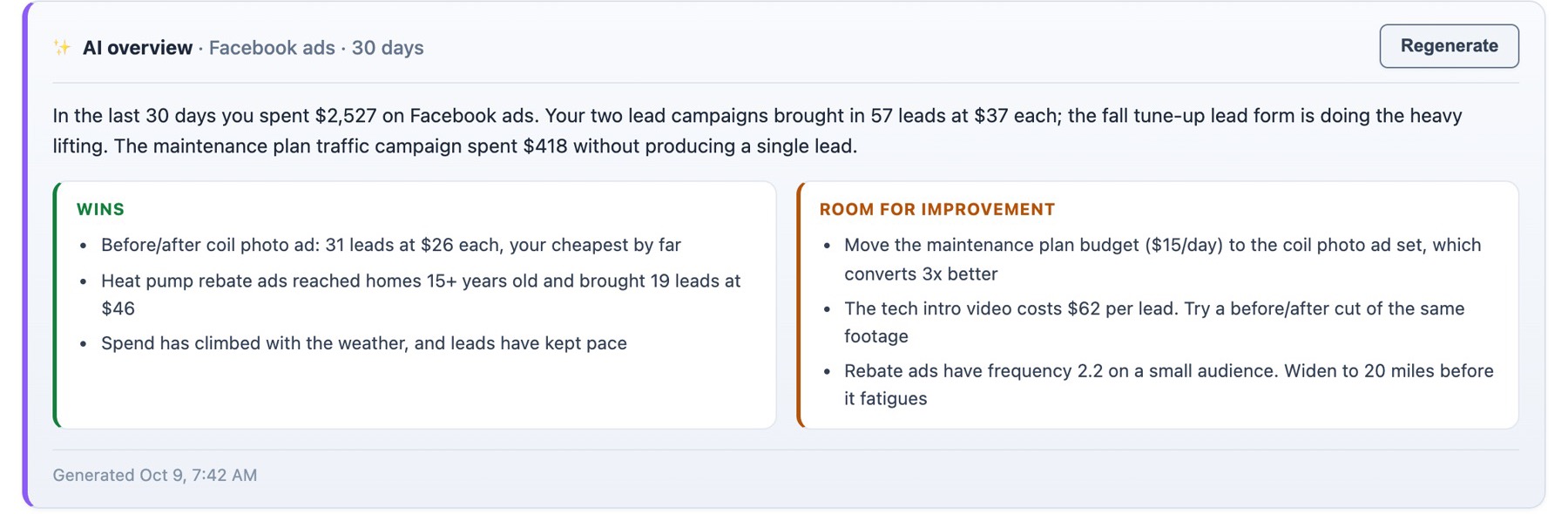
Facebook ads · AI analytics

Your ad spend, analyzed by AI

Connect your Facebook ad account and press AI Analyze. Homer reads your spend, results and individual ads, then tells you in plain English which ads are earning their budget, which are wasting it, and exactly what to change.

HomerAI's AI overview of 30 days of Facebook ads: $2,527 spent and 57 leads at $37 each. Wins include a before-and-after ad bringing 31 leads at $26 each; room for improvement includes moving the maintenance plan budget to that ad set and widening the rebate ads' audience before it fatigues.

Cost per lead, not vanity metrics

Results are counted the way each ad set was optimized, so you see what a lead actually cost — and which ad got it.

Fixes specific to your account

Not generic tips: which budget to move, which creative to cut, which audience is about to fatigue.

Every number behind it

Spend, reach, CTR, CPC and CPM with trends, and every campaign, ad set and ad down to the creative.

See Facebook ads AI in detail

Website builder

A website that feeds your CRM

HomerAI builds your website too, so the site that brings in your leads and the system that works them are the same product.

  • Generated with AI. A starting site written from your business, which you edit rather than build.
  • Bring your existing site. Import the pages you already have instead of starting over.
  • An assistant that edits for you. Ask for a change in plain English. Homer proposes the edit and nothing goes live until you approve it.
  • Lead forms into the CRM. Enquiries from your site arrive as contacts, not as emails someone has to copy across.
  • Your own domain. Published on your domain, with the security certificate handled for you.
  • Suggestions and traffic. Homer recommends improvements to each page and shows which pages get visits and where they come from.

How the AI website builder works

Built for home services

One platform for every trade that comes to the door

Whatever your crews do at a customer's home, HomerAI runs it the same way — the call that books the job, the route, the checklist, the photos, the quote, and the follow-up.

Trust & control

Autonomy you can dial in

Permission by action

Decide what Homer does alone and what waits for a human — booking, rescheduling, discounting, quoting above a threshold. Change it any time.

Every decision logged

Each autonomous action records what Homer knew, what it chose, and why. Call recordings and transcripts are retained on your policy.

Your data leaves when you do

Full export of customers, jobs, equipment history, and quotes in open formats. No hostage-taking, no export fee.

Bring us a week of your real calls

We'll run your actual job mix through Homer and show you the board it would have built.